Lorna F. - Author
I gave away my Apple ID info :-(
I write this to caution people against scammers out there.
Last month I was searching on the Internet for some help with my Apple devices. Google gave me what I thought was the Apple Support number to call. When I called them I talked to a support representative who made me think he was with Apple. I proceeded to tell him my issues and then he asked for my Apple ID & PW along with my two-factor code so that he could have a look at my Apple ID profile and help me. So I provided all of that information to him over the phone. He said that my account was accidentally charged and that I am due some credit back and he would help me resolve this.
Later I found out that this guy ended up changing the email that my Apple ID was based on, my password and the trusted phone number all because I gave him access to my account based on my trust that he was from Apple. Looking back as I wrote down his number it was not the 800-MY-APPLE number.
The ramifications of this sent me into a tizzy as my new 24-inch iMac, MacBook Air, Pad Air and iPhone Xs Max were all signed into my 8+ year old and established Apple ID. Now I'm really stuck. All my devices are constantly asking me for my Apple ID PW to an Apple ID is not even my email address. I can't use Forgot my password, because I can't even receive an email to an address that I don't have access to. I called AppleCare Support at 800-MY-APPLE (now that I know) and spoke with them about the problem. They said they cannot put my account into recovery mode because I don't even know the trusted phone number associated with my old Apple ID. All Apple's website provided is the last two digits ### ### ##17 which is not my phone number. The AppleCare support rep said they can work with me if I provide a proof of purchase on the iMac to get it out of activation lock because it is tied to my old Apple ID which I now have lost control of. I was able to provide proof of purchase on the new 24-inch iMac and they helped me erase it, but they did not make sure I had a backup of my data and then they unlocked it from their end. Because they did not help me back up my data, they asked me if I had a backup of my other MacBook Air which I did and so they helped me restore that backup, which in hindsight, makes no sense. Now my iMac name is MacBook Air and it drives me crazy.
My iPad is also locked to my old Apple ID and they asked for proof of purchase which I was able to get them because I had originally purchased it from the Apple Store. However, after a week they denied the activation unlock request w/o explanation or justification. Even though as plain as day is the date it was purchased, the serial number and everything they asked for. They have put in the records of the case # for the serial number of my iPad Air 3, that they will not consider future unlock requests for this device and the decision is final. Wow!
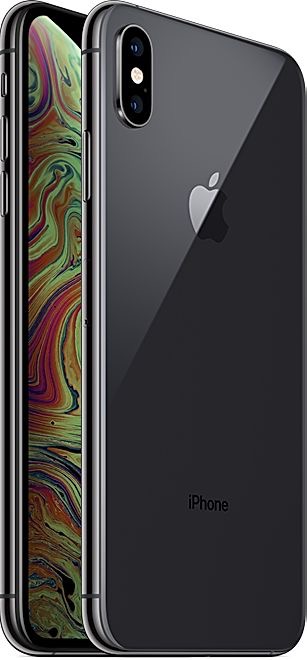
I also have this older iPhone Xs Max that is also locked to my old Apple ID with Find my... turned on. I'm constantly bombarded with messages asking for this Apple ID PW based on an email that I don't even know or have access to. My phone, the trusted Apple device I use and count on every day is now almost unusable. I had a passcode on it and protected it and the information in it, but because I gave access to my Apple ID and the PW and the two-factor code, I literally gave away what seems to be all my devices, my data stored on iCloud and all of my digital assets like music, movies, apps that were sold to me over the years. Not only that, but I had to close down all of my bank accounts, get new credit cards, all of my other accounts which have my authorization to use my cards are now all outdated which causes BIG problems with late fees and so much more. Omg!
When talking to AppleCare Support about unlocking my iPhone Xs Max, they asked for proof of purchase. This phone is getting older now and I know I purchased it from Verizon. But when calling Verizon they said their records don't go back that far and cannot provide me proof of purchase. I know this must have been. sent to my husband's email address be we cannot find that either. So Apple cannot or will not release activation lock.
Where can I go? What can I do? So in my mind, I had to start fresh. So I went out and bought a new iPhone 14 Pro Max but the Verizon rep could not help me with my old Apple ID and said that I should just start a new one. So he helped me do that. But now I have no contacts, no pictures or any apps on my new iPhone, because I can't even restore the backup of my iPhone from iCloud.
Verizon said they would give me $400 pro-rated trade-in credit towards my new iPhone 14 if I can get the Find my turned off on my old iPhone Xs Max.
I went to a local screen repair shop Mobile Madness with my old iPhone Xs Max to ask if they can help. They said they could scrape my pictures off of the old iPhone and import them into the new iPhone as well as my contacts. But as far as helping her with turning off Find my... on my old iPhone Xs Max, they referred me to a local Apple Consultant and said "if anyone can help you it's Todd Derek in Eagle Point, OR. He has 30+ years of experience in helping people with their Apple technology". https://smarthelp.store
I called Mr. Derek at 541-255-2310, knowing this is not the official Apple support number, but having a certain amount of hope because it was a referral from a real retail mobile repair business with a store. I explained to Mr. Derek my situation and he listened well and said he was the one to help me. Phew... I sure hope so I thought.
I made arrangement and scheduled an appointment with Mr. Derek. He offered that I come to his home office, or could work with me over the Internet or he would be willing to come to my home and talk to me with my husband. Because there were so many complexities, and I wanted my husband's opinion on how I should best move forward, we asked Mr. Derek to come out to our house.
Todd was very responsive as he knew this was very disrupting for me. When he arrived, the first thing he did was took me through Account Registration, taking my contact information down, and then asked me to sign his Terms of Service which included a nondisclosure agreement. This stated that all of the information I provided to him would be confidential and used on my behalf —unlike the original fake Apple representative that deceived me and took over my account. Mr. Derek also stated in this agreement his hourly rate and it gives him the approval to work on my devices. I now believe that this is the key difference when working with ANYBODY, when they ask for sensitive information like passwords, and access to my Apple ID along with a two-factor code. Oh my! So far so good!
Todd then proceeded to document the serial numbers and specifications, the password/passcodes on all my devices and their current status and which Apple ID they were logged into with Find my... turned on or not. I also gave him the back story for all that had happened. There seemed to be some holes in my story because I just could not remember all of the details.
He called Apple at 800-MY-APPLE based on my case # I had and talked to someone that was a front liner (tier-1 support). Todd gave her the case # and a quick summary of what we need help with to put my old Apple ID into recovery mode and then quickly asked to talk to a Senior Advisor at Apple. However the woman he was talking with seemed to be answering all of his questions just fine so Todd proceeded with her until she could not answer his questions.
Ultimately, we all came to the conclusion that there is no way for me to recover my old Apple ID, because I don't known the trusted telephone number now associated with my old Apple ID. Even though CLEARLY, Apple has logs and can see that my Apple ID was changed from my old email address to this different one that I don't even know, as well as my old trusted number was changed to the new number and even a recovery email address was taken off. CLEARLY, Apple would be able to see that the First and Last name was changed and that I poses all of the previously trusted devices. And yet... Apple has NO PROTOCOL to get me back control of my old Apple ID. In this case Apple Engineering and Activation support have room for improvement. Especially when I can prove that I am the rightful owner of this Apple ID and devices. I could have provide a credit card number on file at Apple. I could have provided a picture of my drivers license with picture and the location of my home to Apple. There are many ways I can prove my identity to Apple so that they could have helped me regain control of my old Apple ID and my devices which are now useless. But no, Apple said that if I don't know the now trusted phone number of my old Apple ID, we cannot put my account into recovery mode, so that I can even change the trusted phone number on my account and then change the email back and password to re-secure my old Apple ID account. This is crazy Apple will not help me after all I have invested in to them.
Breath... in and out... everything will be fine. Let's just move on I thought.
Okay so I am now coming to grips that there is nothing we can do to regain access to all of my data, assets and even my hardware that is locked to my old Apple ID. Oh did I mention that I also have an Apple Watch that is no longer able to do ANYTHING because it's locked to my old Apple ID? Yes, yes, I know... breath and move on.
Okay, I need to focus on the good things, so I'm thankful so very much for Todd and his guidance and hands-on assistance.
Moving forward Todd has come up with a plan to
1) To get me setup on a new Password Management system so that he is re-securing my identity so that every account I touch moving forward has a new password system that is easy to remember and Internet compliant, that only Todd and I know. And this is information is protected with this nondisclosure agreement we have in place.
2) He will erase my new iMac since AppleCare did not help me set it up properly and lost all of my data I had on it.
3) Get m a new hard drive so that in the future my iMac backs up automatically with Time Machine and does not lose any data.
4) He will help me back up my MacBook Air and then erase it and get it setup properly from scratch. His approach of setting it up as a new device to my new Apple ID and then doing Data Integration is much cleaner than migrating or restoring a backup from a device that has lots of problems and bad data, old installers, apps that don't work on my new machines etc. Omg!
5) So that I don't have to be w/o my iPhone, he offered to get my Macs setup first and working perfectly where he tests everything before he brings them back to me. Then, he'll come an hour early and get my new iPhone 14 Pro Max all setup.
6) He will erase my old devices that I can no longer use because they are associated with my old Apple ID, and recycle them so that my data is not just lingering in lala land.
7) When he has everything all setup and working perfectly, he will give me some training on how to best use them. He said we'll go over best practices and how to organize. The best part is he records it all on a screen move which also records our voices. So I can always refer back to it. Amazing! Praise God!
8) He got me setup on his monthly subscription where we meet once a month remotely and he makes sure I'm backing up all my devices, staying up to date and will answer all my questions and make recommendations. Moving forward I will write down these questions on the Notes.app which will be syncing between all my devices. Omgoodness. This is technology bliss, which I've never experienced. Because Apple has not trained me. When I buy a new device, my cell phone provider does not train me. I've always just have winged it. Until now.
So BIG lesson learned... Always be careful who I lean on for help, especially when I give out confidential information like passwords and two-factor codes. Thankfully I found Todd Derek with 30+ years of experience in Apple technology who is a real people person and easy to understand and communicate with.
In the end, I'm much better off, with my new devices, all setup, syncing, backing up and up to date. And now I can get all my questions answered for anything I come up with in the future. I also now have a trusted relationship with a seasoned Apple Consultant which I would HIGHLY recommend to anyone!
Device: iPhone Xs Max (Space Gray)
Operating System: iOS 16.2